




The CO-206 denial code indicates that a healthcare claim is missing a required National Provider Identifier (NPI). This denial typically occurs when billing, rendering, referring, or ordering provider information is incomplete. To fix it, review the denied claim, identify the missing NPI, verify it through the NPI Registry, and submit a corrected claim according to payer guidelines. If the denial is incorrect, request reconsideration or file an appeal.
Key Takeaways
-
CO-206 denial code means a required National Provider Identifier (NPI) is missing from a healthcare claim.
-
Common causes include missing billing, rendering, referring, or ordering provider NPIs and incomplete electronic claim submissions.
-
How to resolve CO-206: Identify the missing NPI, verify provider details, correct the claim, and resubmit it according to payer requirements.
-
Appeals may be necessary when the original claim contains the required NPI but the payer still denies it.
-
Prevent future denials by validating NPIs, maintaining accurate provider records, and using automated claim-scrubbing checks before submission.
What Is CO-206 Denial Code?
The CO-206 denial code indicates that a healthcare claim is missing a required National Provider Identifier (NPI). The official Claim Adjustment Reason Code (CARC) 206 description is “National Provider Identifier (NPI) missing.” It means the payer cannot process or pay the claim as submitted because required provider identification information is absent.
The code has two components:
- CO (Contractual Obligation): Indicates an adjustment that is not the patient’s responsibility because of contractual or regulatory requirements.
- 206 (Claim Adjustment Reason Code): Identifies the missing NPI as the reason for the adjustment.
Healthcare providers use NPIs to identify themselves in standard electronic healthcare transactions. A missing billing, rendering, referring, or ordering provider NPI can result in a CO-206 claim denial when that identifier is required.
According to the X12 Claim Adjustment Reason Codes, CARC 206 specifically identifies a missing NPI, rather than an invalid or mismatched identifier.
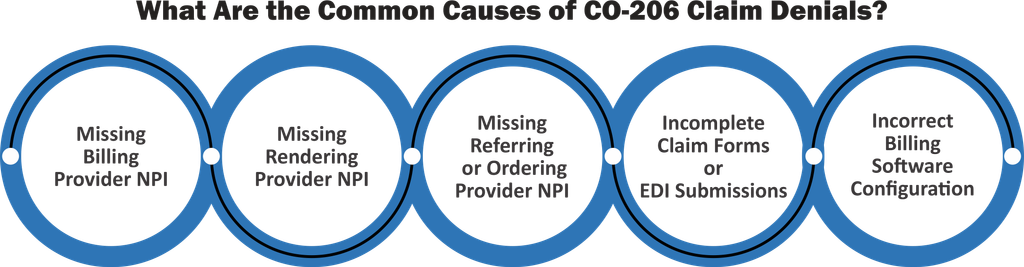
What Are the Common Causes of CO-206 Claim Denials?
The most common CO-206 denial code causes involve missing provider identification details, incomplete claim submissions, or billing system errors. Identifying which NPI is missing helps billing teams correct the claim without unnecessary resubmissions.
1. Missing Billing Provider NPI
The billing provider NPI identifies the healthcare professional or organization requesting payment. If this required identifier is absent, the payer may deny the claim because it cannot identify the billing entity.
For professional claims submitted using the CMS-1500 form, the billing provider NPI is generally reported in Box 33a.
2. Missing Rendering Provider NPI
The rendering provider is the healthcare professional who performed the billed service. When the payer requires a rendering provider NPI and it is missing, the claim may receive a CO-206 denial.
For example, a group practice might submit a claim using its organizational NPI but omit the individual clinician’s required rendering NPI.
3. Missing Referring or Ordering Provider NPI
Certain services require the NPI of the healthcare professional who referred the patient or ordered the service. This commonly applies to services such as diagnostic tests, imaging, and other services subject to payer-specific ordering or referral requirements.
If the required referring or ordering provider NPI is omitted, the payer may deny the claim.
4. Incomplete Claim Forms or EDI Submissions
A claim can contain accurate patient and service information but still lack a required provider identifier.
Common submission problems include:
- Leaving required NPI fields blank on the CMS-1500 form.
- Omitting provider identification segments in an 837 electronic claim.
- Failing to transfer provider information from the electronic health record (EHR) to the billing system.
These errors can result in missing NPI information even when the provider has an active identifier.
5. Incorrect Billing Software Configuration
Billing software may fail to populate required NPI fields because of incomplete provider profiles, incorrect field mapping, or outdated claim templates.
For example, if the rendering provider NPI is stored in the practice management system but is not mapped to the correct electronic claim field, the payer may receive a claim without that identifier.
How to Fix CO-206 Denial Code: Step-by-Step
To fix the CO-206 denial code, identify the missing provider NPI, verify its accuracy, update the appropriate claim field, and resubmit the claim according to the payer’s requirements.
Follow these six steps to resolve the denial efficiently.
Step 1: Review the Denial Details
Start by reviewing the Explanation of Benefits (EOB) or Electronic Remittance Advice (ERA). Confirm that the claim was denied with CO-206 and check for accompanying remark codes or payer messages.
Record the claim number, date of service, payer information, and any additional denial details. If the remittance does not identify which provider NPI is missing, contact the payer for clarification.
Step 2: Identify the Missing NPI
Compare the original claim against the payer’s provider identification requirements.
For professional claims, review these CMS-1500 fields where applicable:
| CMS-1500 Field | Provider Information |
| Box 17b | Referring or ordering provider NPI |
| Box 24J | Rendering provider NPI |
| Box 33a | Billing provider NPI |
For electronic 837 claims, review the corresponding provider identification segments.
Not every provider NPI is required on every claim. Requirements depend on the service, provider arrangement, claim type, and payer.
Step 3: Verify the Provider’s NPI
Once you identify the missing identifier, verify it through the official CMS NPI Registry.
Confirm that the NPI belongs to the intended provider and that the provider’s name and entity type match the claim information.
Remember that an NPI’s presence in the registry does not automatically confirm payer enrollment or eligibility for reimbursement.
Step 4: Correct the NPI Information
Enter the verified NPI into the appropriate claim field. If the problem originated in the billing software, update the provider profile or field mapping to prevent repeated omissions.
Before resubmission, review the claim for other missing information, including provider details and required identifiers.
Step 5: Resubmit the Corrected Claim
Submit the corrected claim using the payer’s specified process.
Some payers require a replacement claim with the original claim reference number, while others may instruct providers to submit a new claim or follow a different correction process.
Check the payer’s instructions before resubmitting to avoid duplicate claim denials or timely filing issues.
Step 6: Track the Claim Until Resolution
Monitor the corrected claim through the payer portal, clearinghouse, or billing system.
Confirm that the payer has accepted the submission and completed adjudication. If the claim is denied again, review the new adjustment and remark codes before taking further action.
Example: A medical practice receives a CO-206 denial for an office visit because the rendering provider NPI was omitted from the claim. The billing specialist verifies the clinician’s NPI, updates Box 24J, and resubmits the claim using the payer’s correction process. The claim can then be reconsidered for payment, subject to other coverage and billing requirements.
CO-206 Remark Codes and Related NPI Denial Codes
A CO-206 remark code is not a separate, universal code assigned to every CO-206 denial. CO-206 combines a Claim Adjustment Group Code (CO) with a Claim Adjustment Reason Code (206). A payer may also include a Remittance Advice Remark Code (RARC) to provide additional information.
CARCs explain why a claim payment was adjusted, while RARCs provide supplementary details. Billing teams should review both when troubleshooting denials.
The official X12 Remittance Advice Remark Codes list provides the definitions of individual RARCs.
CO-206 vs. CO-207 vs. CO-208
Although these codes all relate to National Provider Identifiers, they describe different problems.
| Denial Code | Description | Recommended Action |
|---|---|---|
| CO-206 | NPI is missing | Identify and enter the required NPI. |
| CO-207 | NPI has an invalid format | Correct the identifier’s format. |
| CO-208 | NPI does not match | Verify the NPI against the provider information and payer records. |
The distinction matters because entering an NPI will not necessarily resolve an invalid-format or mismatch denial. Each code requires a correction based on the actual issue.
How to Appeal a CO-206 Denial
A CO-206 denial appeal may be necessary when the original claim includes the required NPI, but the payer still denies it. However, if the NPI is genuinely missing, submitting a corrected claim is usually more appropriate than filing a formal appeal.
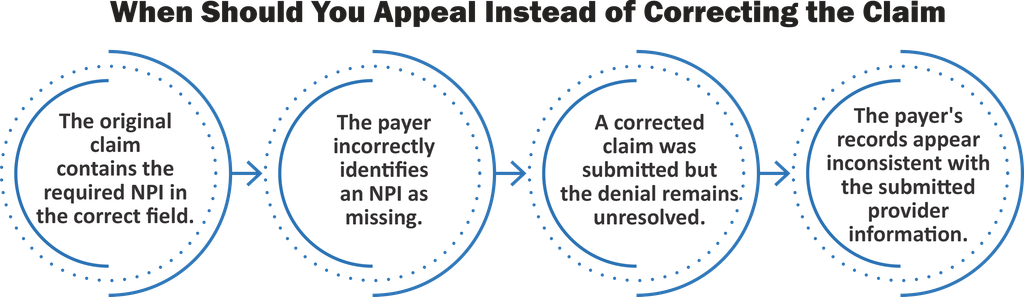
When Should You Appeal Instead of Correcting the Claim?
Consider requesting reconsideration or filing an appeal when:
- The original claim contains the required NPI in the correct field.
- The payer incorrectly identifies an NPI as missing.
- A corrected claim was submitted but the denial remains unresolved.
- The payer’s records appear inconsistent with the submitted provider information.
Before appealing, contact the payer to confirm the denial reason and determine whether reconsideration or a formal appeal is required.
What Documentation Is Needed for a CO-206 Appeal?
Supporting documentation helps demonstrate that the required NPI was included or that the denial was issued incorrectly.
Depending on the payer’s requirements, prepare the original claim, ERA or EOB, verified provider NPI information, clearinghouse submission records, and relevant payer correspondence.
Include a concise explanation of why the denial should be reconsidered.
How to Submit a CO-206 Denial Appeal
Review the payer’s appeal instructions and filing deadline. Submit the appeal through the designated portal, electronic process, or mailing address, along with the required supporting documents.
Keep a record of the appeal submission and follow up until the payer issues a determination.
Important: Corrected claim deadlines and appeal deadlines may differ. Submitting a correction does not automatically extend the time available to appeal.
How to Prevent CO-206 Denials in Medical Billing
Preventing CO-206 claim denials requires accurate provider records, consistent NPI validation, and reliable claim submission processes. Proactive checks can reduce administrative rework and avoid unnecessary payment delays.
1. Validate NPIs Before Claim Submission
Verify that all required provider NPIs are present before transmitting claims. Confirm that each identifier belongs to the appropriate billing, rendering, referring, or ordering provider.
2. Maintain Accurate Provider Records
Keep provider profiles updated in EHR and practice management systems. Review NPI information whenever providers join a practice, change billing arrangements, or update their professional information.
3. Implement Automated Claim Scrubbing
Use claim-scrubbing tools to identify missing required NPIs before claims reach the payer.
Configure validation rules according to payer requirements, claim types, and provider roles rather than requiring every NPI field on every claim.
4. Train Medical Billing Teams
Train billing staff to recognize NPI-related denial codes and understand the difference between missing, invalid, and mismatched identifiers.
Standardized correction procedures can help teams resolve denials consistently.
5. Monitor Recurring NPI-Related Denials
Track CO-206 denials by payer, provider, claim type, and submission source.
If denials repeatedly involve the same provider or billing workflow, investigate the underlying system configuration instead of correcting each claim individually.
Regular denial analysis can help practices identify preventable errors and improve revenue cycle efficiency.